> ## Documentation Index
> Fetch the complete documentation index at: https://docs.ondo.finance/llms.txt
> Use this file to discover all available pages before exploring further.

# USDY and mUSD Conversion

# What is the difference between USDY and mUSD?

USDY exists in two forms on Mantle. USDY is the accumulating form, and mUSD is the distributing form.

* USDY: an accumulating ERC-20 token with a redemption value that increases daily.
* mUSD: a distributing ERC-20 token pegged to \$1. mUSD holders automatically receive their yield in their wallet via additional mUSD tokens.

Users receive the same amount of interest regardless of the token they hold.

Users can convert anytime from USDY to mUSD and from mUSD to USDY using the Ondo Token Converter.

# How can I convert between USDY and mUSD?

## Convert from the Ondo Finance website

You can use the Ondo Token Converter on [ondo.finance/convert](http://ondo.finance/convert), where you can connect your wallet and convert your USDY to mUSD and vice-versa.

## Convert from the Mantle Explorer

You will need to interact with two contracts:

* [USDY](https://explorer.mantle.xyz/address/0x5bE26527e817998A7206475496fDE1E68957c5A6/contracts?contract-tab=read-proxy#address-tabs)
* [mUSD](https://explorer.mantle.xyz/address/0xab575258d37EaA5C8956EfABe71F4eE8F6397cF3/contracts?contract-tab=write-proxy#address-tabs)

### From USDY to mUSD

This is a two-transaction process.

**First transaction: Approve mUSD to spend your USDY**

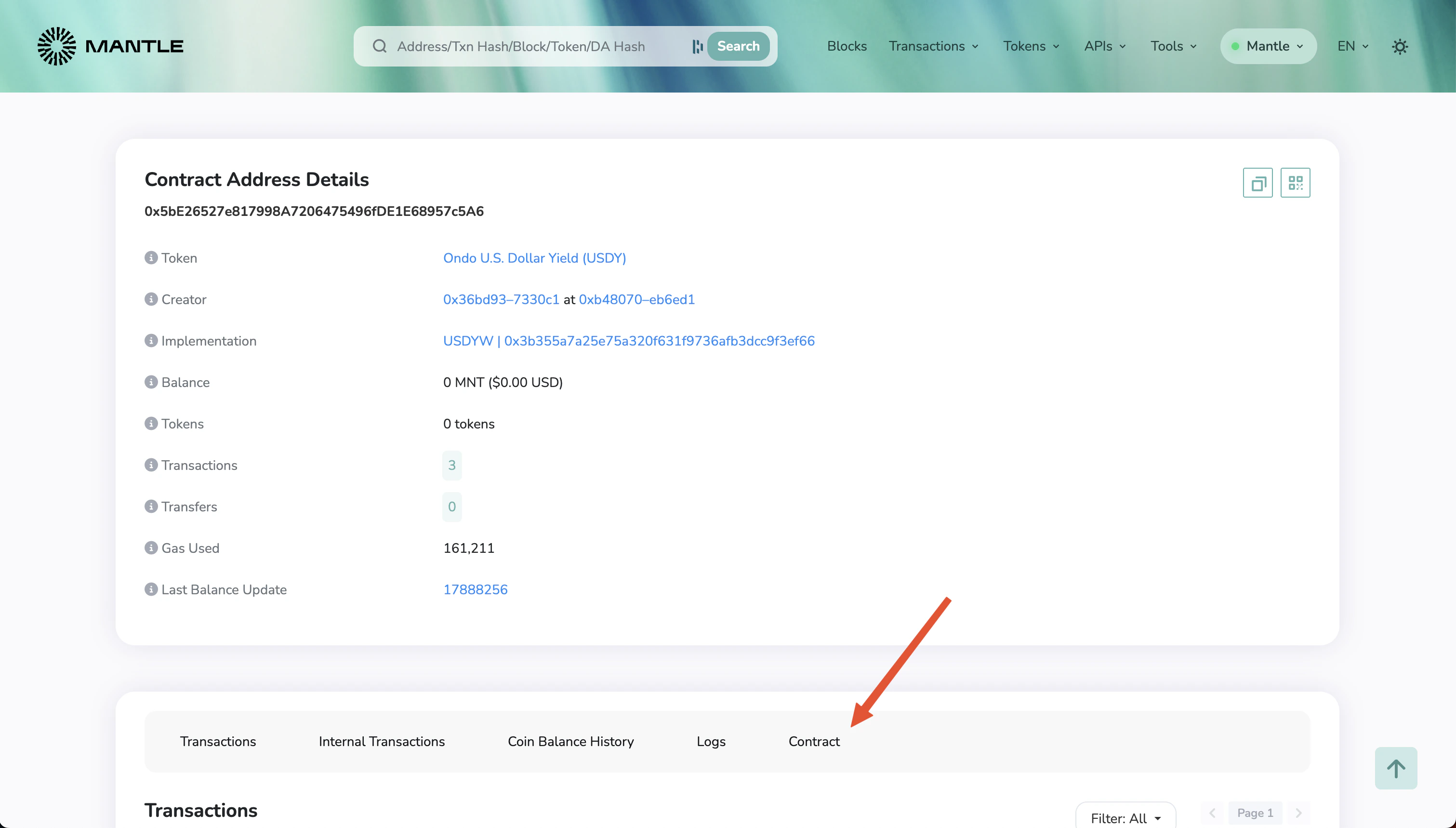
Open the [USDY address in the Mantle explorer](https://explorer.mantle.xyz/address/0x5bE26527e817998A7206475496fDE1E68957c5A6).

<ul style={{ display: 'grid', gridTemplateColumns: 'repeat(auto-fit, minmax(300px, 1fr))', listStyle: 'none', gap: '1rem' }}>
  <li>
    <img src="https://mintcdn.com/ondofinance-8a00cd96/KRJ38X1ymyGq9hDd/images/docs/usdy-musd/img1.png?fit=max&auto=format&n=KRJ38X1ymyGq9hDd&q=85&s=0c27ffad5c8f633514344e697a411046" alt="Click on Contract" width="300" data-path="images/docs/usdy-musd/img1.png" />

    <br />

    <figcaption>Click on Contract</figcaption>
  </li>

  <li>
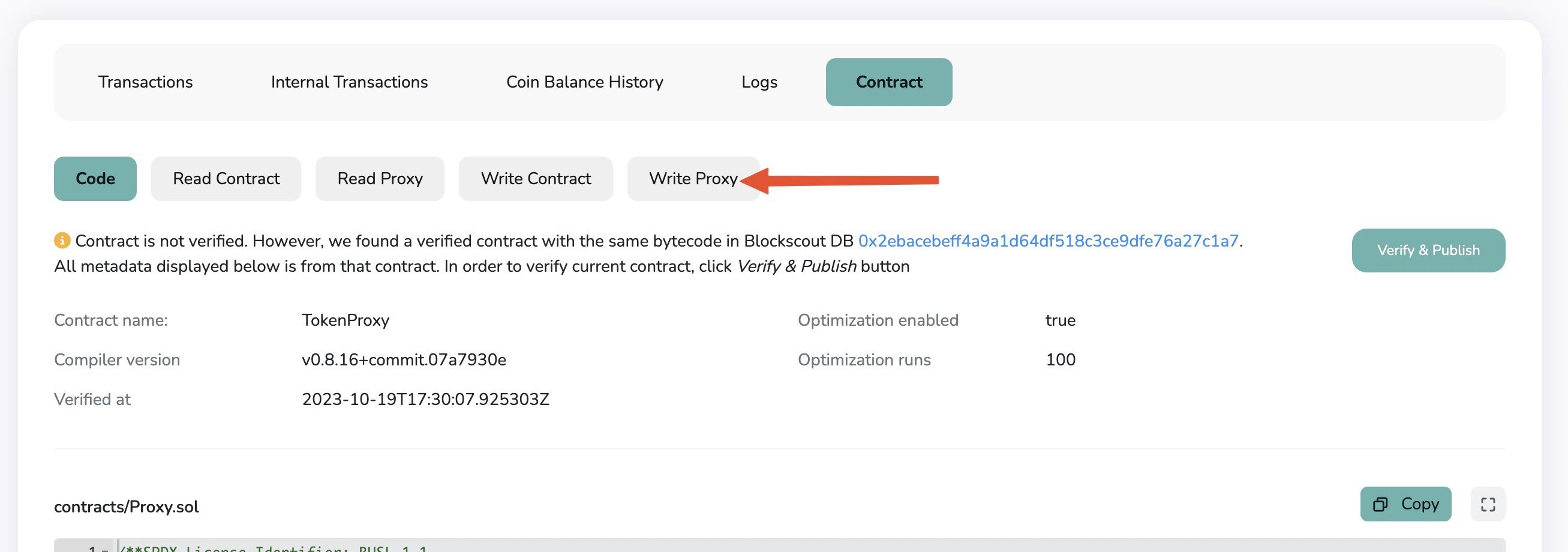
    <img src="https://mintcdn.com/ondofinance-8a00cd96/KRJ38X1ymyGq9hDd/images/docs/usdy-musd/img2.png?fit=max&auto=format&n=KRJ38X1ymyGq9hDd&q=85&s=3628b6578072ab86808293c89646d077" alt="Click on Write Proxy" width="300" data-path="images/docs/usdy-musd/img2.png" />

    <br />

    <figcaption>Click on Write Proxy</figcaption>
  </li>

  <li>
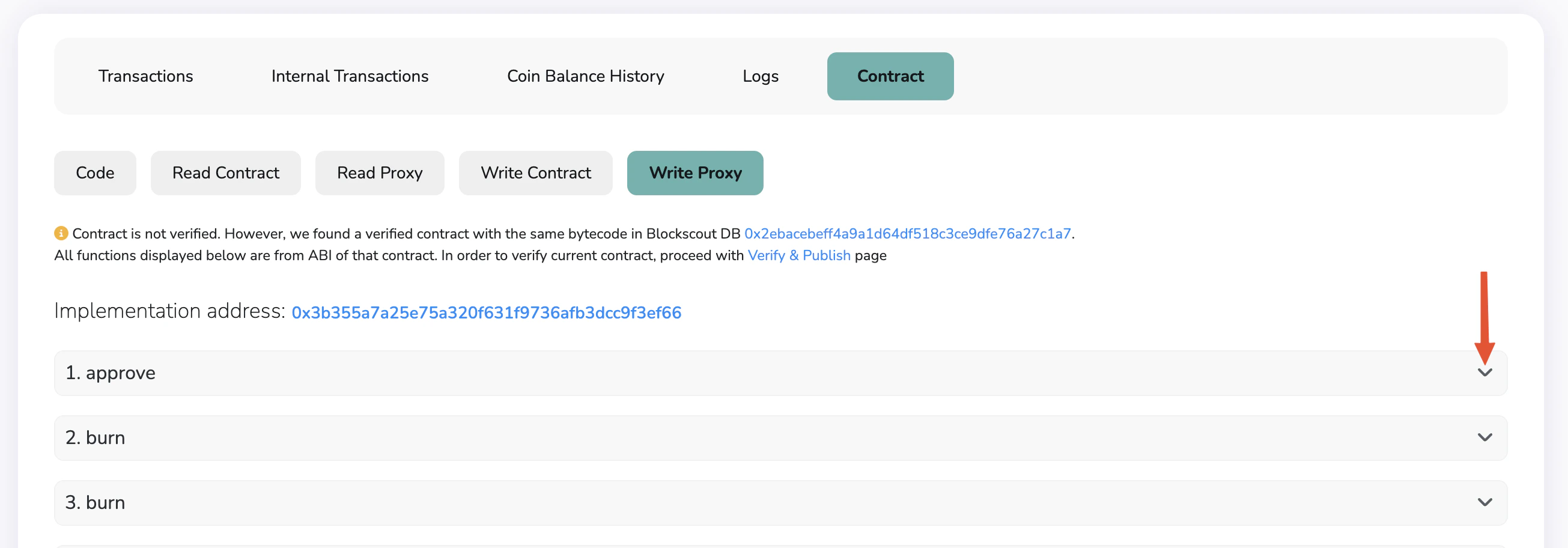
    <img src="https://mintcdn.com/ondofinance-8a00cd96/KRJ38X1ymyGq9hDd/images/docs/usdy-musd/img3.png?fit=max&auto=format&n=KRJ38X1ymyGq9hDd&q=85&s=cd43d7282581515655a4ddeb1112a98c" alt="Identify the 'approve' function, and expand it" width="300" data-path="images/docs/usdy-musd/img3.png" />

    <br />

    <figcaption>Identify the 'approve' function, and expand it</figcaption>
  </li>

  <li>
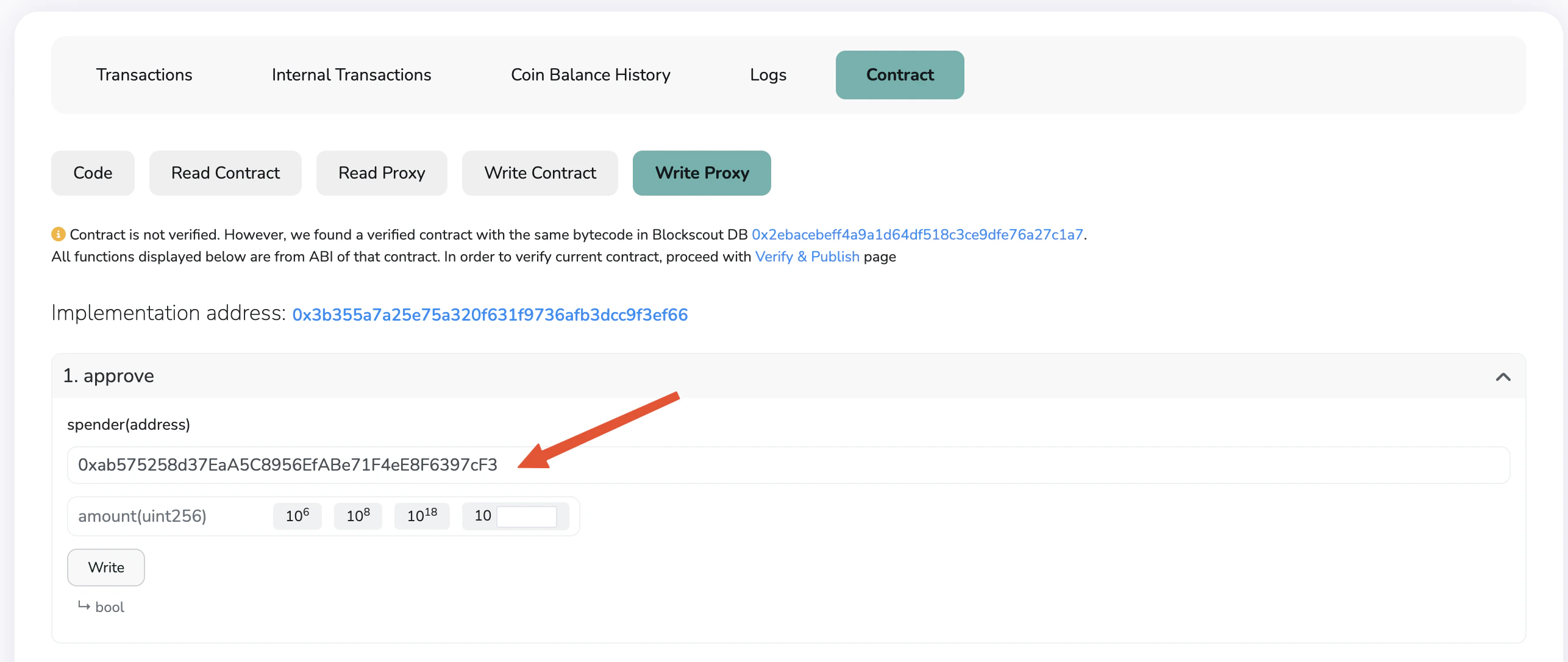
    <img src="https://mintcdn.com/ondofinance-8a00cd96/KRJ38X1ymyGq9hDd/images/docs/usdy-musd/img4.png?fit=max&auto=format&n=KRJ38X1ymyGq9hDd&q=85&s=d877b77b43082f4aeaf289938123d1aa" alt="Insert 0xab575258d37EaA5C8956EfABe71F4eE8F6397cF3 in the spender address. This is the mUSD token address." width="300" data-path="images/docs/usdy-musd/img4.png" />

    <br />

    <figcaption>
      Insert 0xab575258d37EaA5C8956EfABe71F4eE8F6397cF3 in the spender address.
      This is the mUSD token address
    </figcaption>
  </li>

  <li>
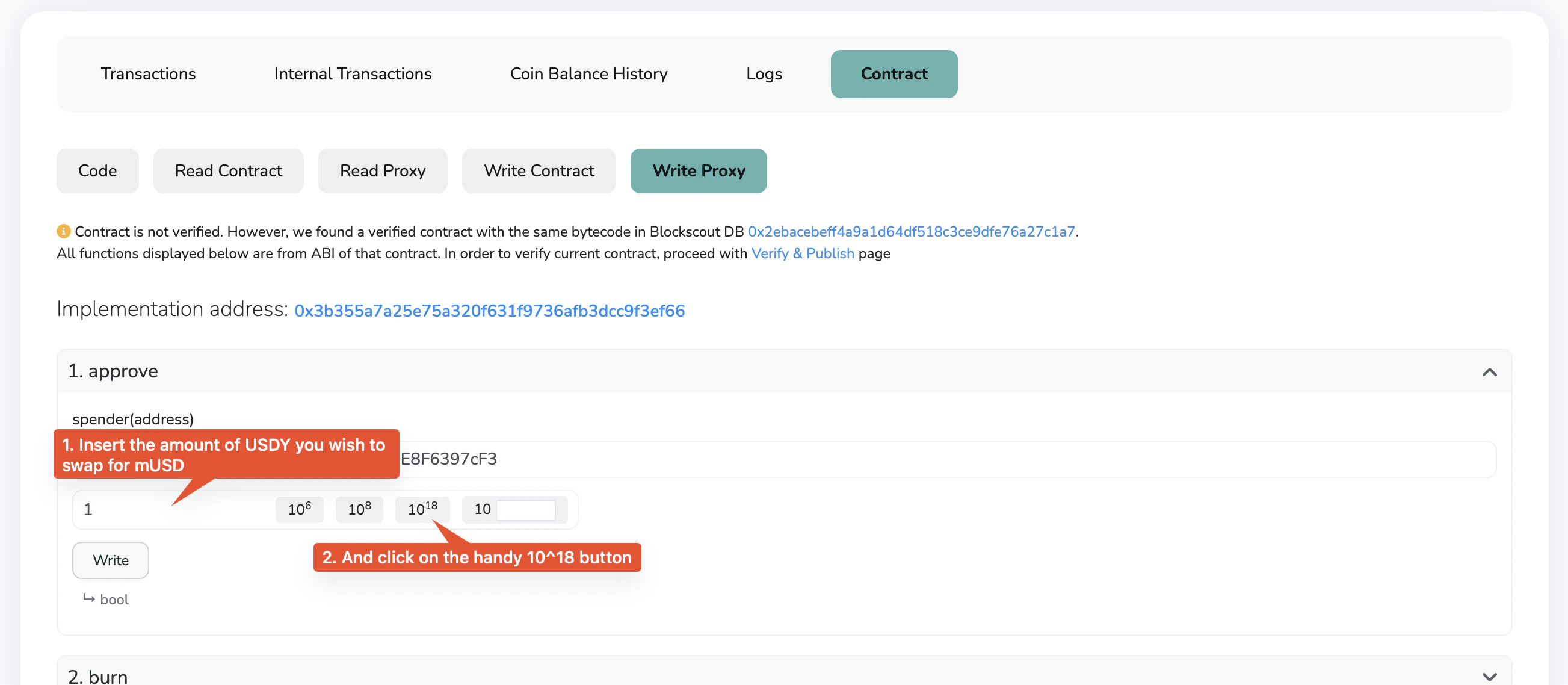
    <img src="https://mintcdn.com/ondofinance-8a00cd96/KRJ38X1ymyGq9hDd/images/docs/usdy-musd/img5.png?fit=max&auto=format&n=KRJ38X1ymyGq9hDd&q=85&s=03bdc4d556eac70a31662a3f106e6796" alt="Insert the amount of USDY you wish to convert for mUSD, and click on the 10^18 button. In this example, 1 USDY is about to be converted for mUSD." width="300" data-path="images/docs/usdy-musd/img5.png" />

    <br />

    <figcaption>
      Insert the amount of USDY you wish to convert to mUSD, and click on the
      10^18 button. In this example, 1 USDY is about to be converted to mUSD
    </figcaption>
  </li>

  <li>
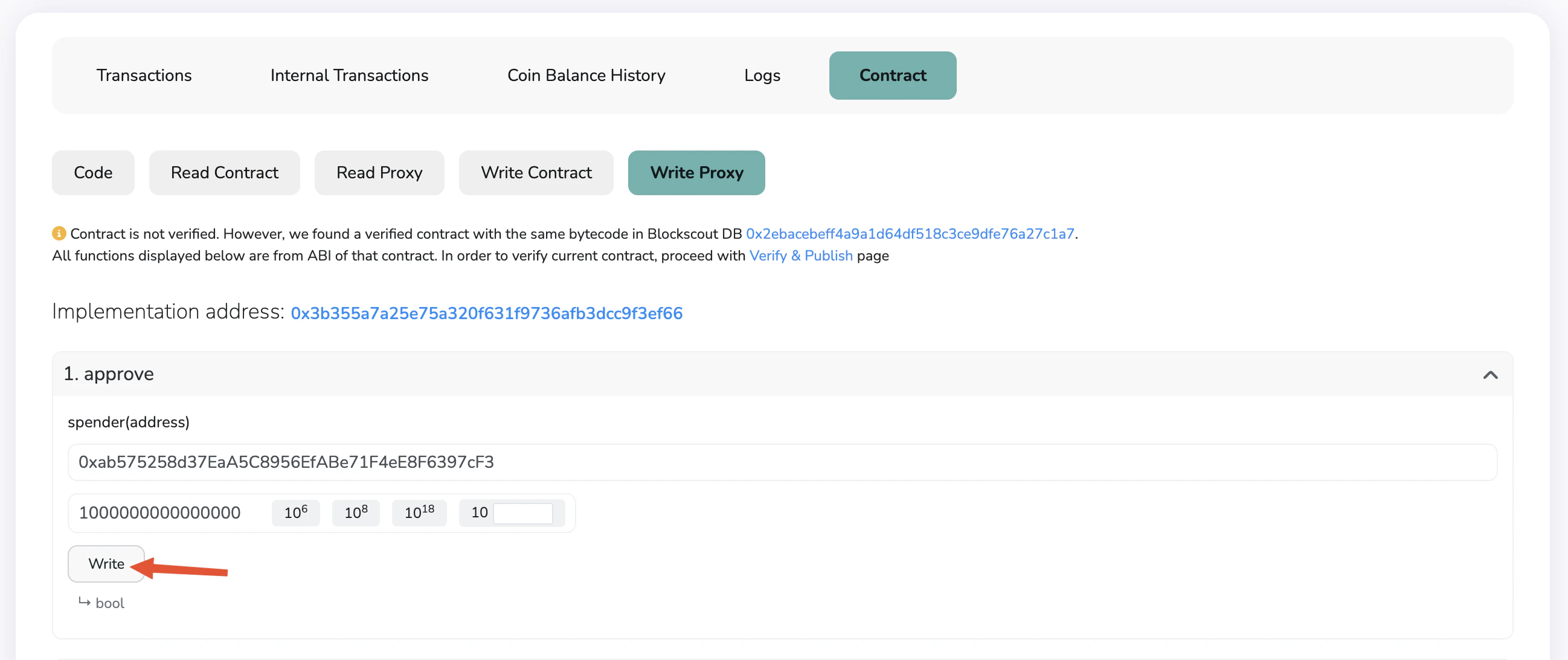
    <img src="https://mintcdn.com/ondofinance-8a00cd96/KRJ38X1ymyGq9hDd/images/docs/usdy-musd/img6.png?fit=max&auto=format&n=KRJ38X1ymyGq9hDd&q=85&s=1f5b76fb4359d2d364547916b33c4354" alt="Click on Write. You will be prompted to connect your wallet, and sign a transaction." width="300" data-path="images/docs/usdy-musd/img6.png" />

    <br />

    <figcaption>
      Click on Write. You will be prompted to connect your wallet, and sign a
      transaction
    </figcaption>
  </li>

  <li>
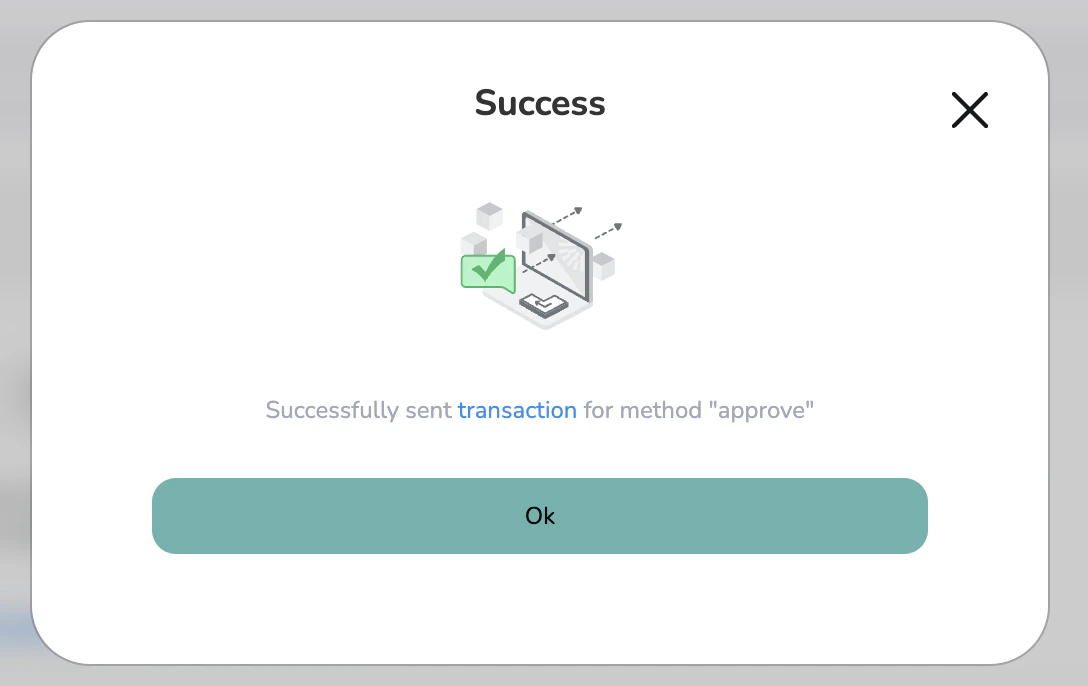
    <img src="https://mintcdn.com/ondofinance-8a00cd96/KRJ38X1ymyGq9hDd/images/docs/usdy-musd/img7.png?fit=max&auto=format&n=KRJ38X1ymyGq9hDd&q=85&s=d8f49415fff371005c502869fa78f2a2" alt="Once the transaction signed, you will see a Success message." width="300" data-path="images/docs/usdy-musd/img7.png" />

    <br />

    <figcaption>
      Once the transaction signed, you will see a Success message
    </figcaption>
  </li>
</ul>

**Second transaction: Convert USDY to mUSD**

* Open the [mUSD address in the Mantle Explorer](https://explorer.mantle.xyz/address/0xab575258d37EaA5C8956EfABe71F4eE8F6397cF3/).
* Similarly to the previous step, click on 'Contract', and 'Write Proxy'.
* Scroll down to identify and expand the wrap function.
* Insert the amount of tokens you wish to convert to mUSD, and click on the 10^18 button.

<ul style={{ display: 'grid', gridTemplateColumns: 'repeat(auto-fit, minmax(300px, 1fr))', gap: '1rem', listStyle: 'none' }}>
  <li>
    <img src="https://mintcdn.com/ondofinance-8a00cd96/KRJ38X1ymyGq9hDd/images/docs/usdy-musd/img8.png?fit=max&auto=format&n=KRJ38X1ymyGq9hDd&q=85&s=6380f0ddc107f85eedce23560bebba1d" alt="Click Write to sign the transaction (your wallet should already be connected to the explorer)" width="300" data-path="images/docs/usdy-musd/img8.png" />

    <br />

    <figcaption>
      Click Write to sign the transaction (your wallet should already be connected
      to the explorer)
    </figcaption>
  </li>

  <li>
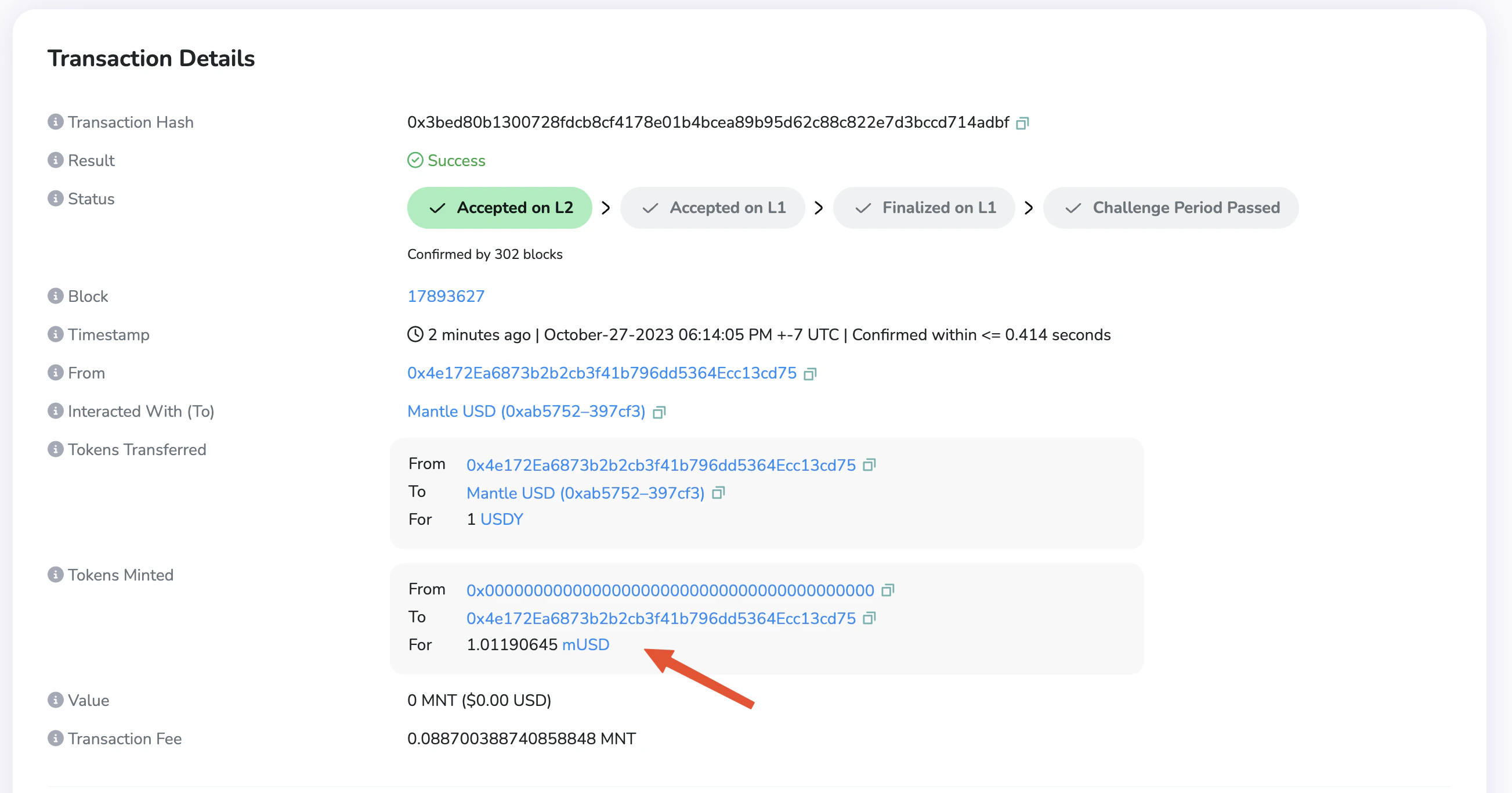
    <img src="https://mintcdn.com/ondofinance-8a00cd96/KRJ38X1ymyGq9hDd/images/docs/usdy-musd/img9.png?fit=max&auto=format&n=KRJ38X1ymyGq9hDd&q=85&s=82abc532068f9752d380b02851e8f294" alt="After confirming in your wallet, you can open the transaction hash in the explorer, and observe the amount of mUSD you received" width="300" data-path="images/docs/usdy-musd/img9.png" />

    <br />

    <figcaption>
      After confirming in your wallet, you can open the transaction hash in the
      explorer, and observe the amount of mUSD you received
    </figcaption>
  </li>
</ul>

### From mUSD to USDY

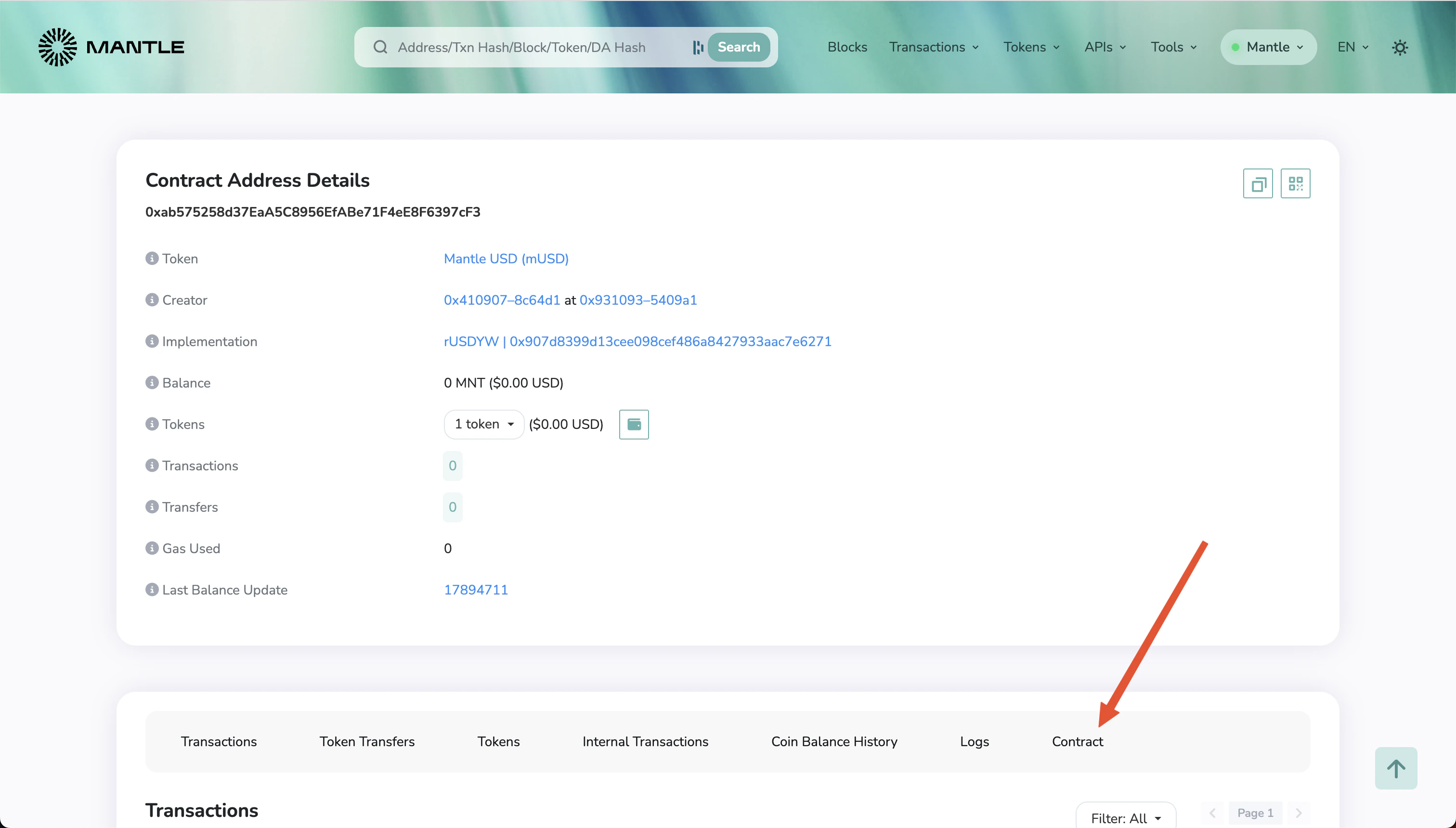
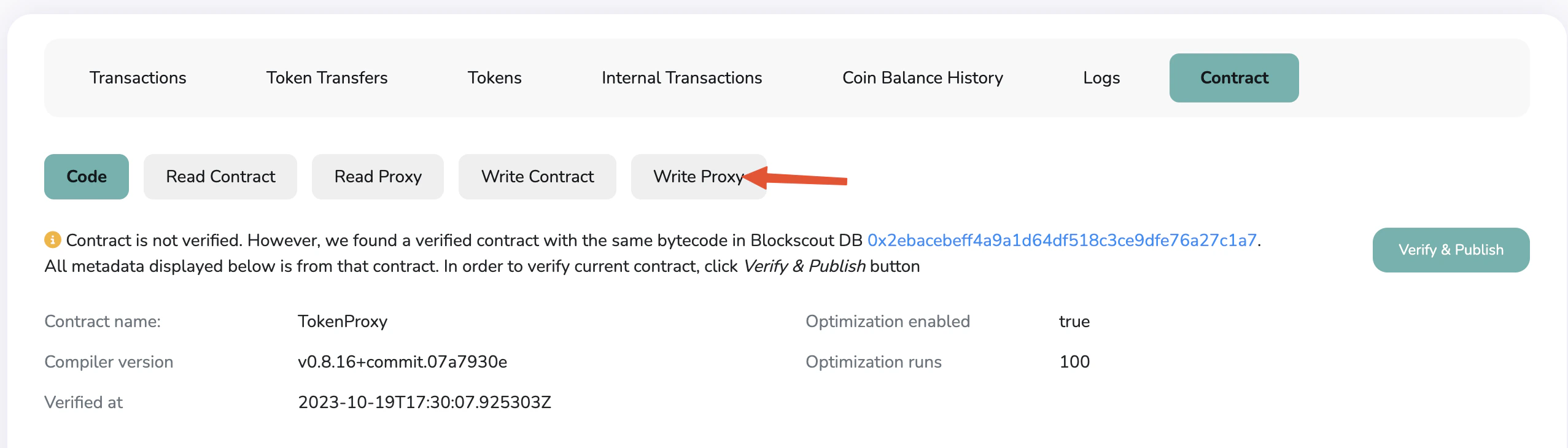
Open the [mUSD address in the Mantle Explorer](https://explorer.mantle.xyz/address/0xab575258d37EaA5C8956EfABe71F4eE8F6397cF3/).

<ul style={{ display: 'grid', gridTemplateColumns: 'repeat(auto-fit, minmax(300px, 1fr))', gap: '1rem', listStyle: 'none' }}>
  <li>
    <img src="https://mintcdn.com/ondofinance-8a00cd96/KRJ38X1ymyGq9hDd/images/docs/usdy-musd/img10.png?fit=max&auto=format&n=KRJ38X1ymyGq9hDd&q=85&s=6aa2bf67f4d22594fb077f4ca585c57e" alt="Click on Contract" width="300" data-path="images/docs/usdy-musd/img10.png" />

    <br />

    <figcaption>Click on Contract</figcaption>
  </li>

  <li>
    <img src="https://mintcdn.com/ondofinance-8a00cd96/KRJ38X1ymyGq9hDd/images/docs/usdy-musd/img11.png?fit=max&auto=format&n=KRJ38X1ymyGq9hDd&q=85&s=bd66beaba0aa507f07d5154a35469421" alt="Click on Write Proxy" width="300" data-path="images/docs/usdy-musd/img11.png" />

    <br />

    <figcaption>Click on Write Proxy</figcaption>
  </li>

  <li>
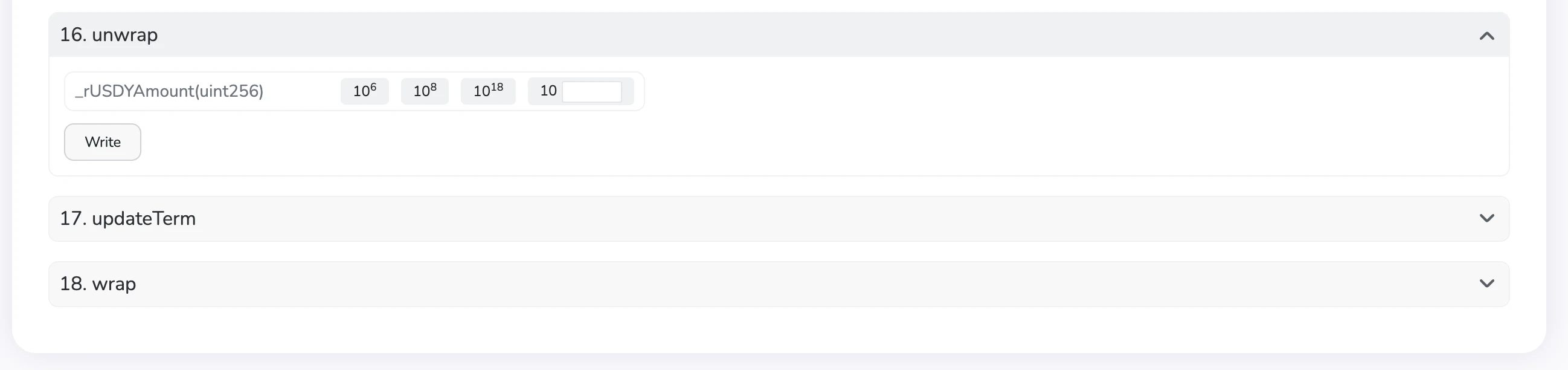
    <img src="https://mintcdn.com/ondofinance-8a00cd96/KRJ38X1ymyGq9hDd/images/docs/usdy-musd/img12.png?fit=max&auto=format&n=KRJ38X1ymyGq9hDd&q=85&s=a733c5c4e70ad8fdb368d1f09f8eebc7" alt="Scroll down to identify the 'unwrap' function" width="300" data-path="images/docs/usdy-musd/img12.png" />

    <br />

    <figcaption>Scroll down to identify the 'unwrap' function</figcaption>
  </li>

  <li>
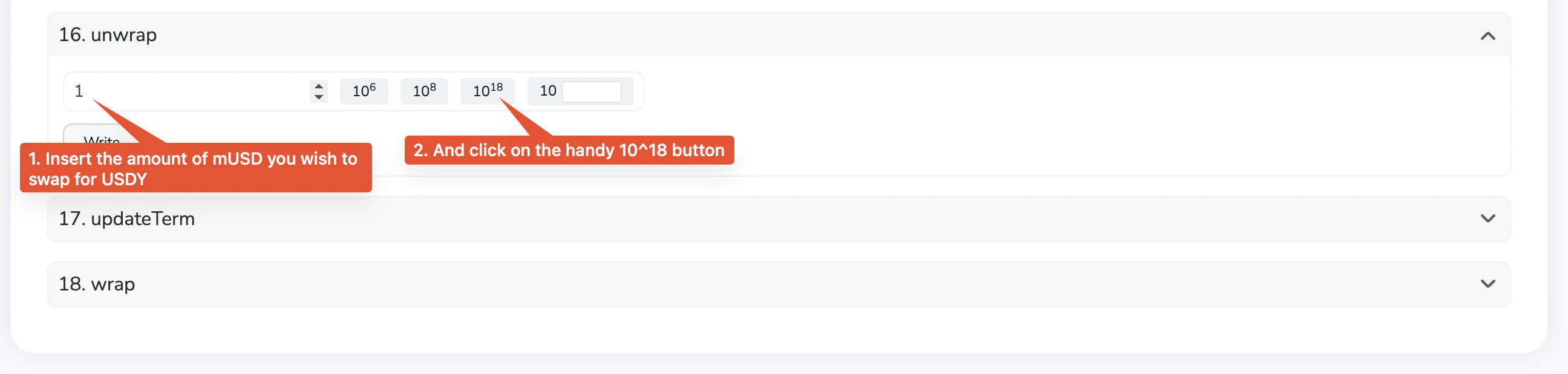
    <img src="https://mintcdn.com/ondofinance-8a00cd96/KRJ38X1ymyGq9hDd/images/docs/usdy-musd/img13.png?fit=max&auto=format&n=KRJ38X1ymyGq9hDd&q=85&s=dee65939d3f8fd13d2995953858a4e97" alt="Insert the amount of mUSD you wish to convert to USDY, and click on the 10^18 button. In this example, 1 mUSD is about to be converted to USDY" width="300" data-path="images/docs/usdy-musd/img13.png" />

    <br />

    <figcaption>
      Insert the amount of mUSD you wish to convert to USDY, and click on the
      10^18 button. In this example, 1 mUSD is about to be converted to USDY
    </figcaption>
  </li>

  <li>
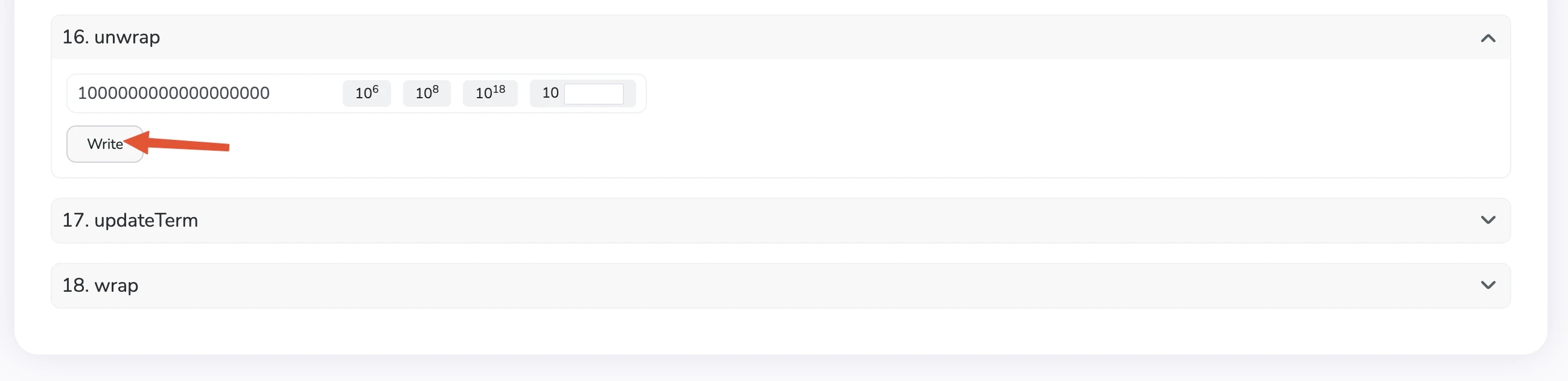
    <img src="https://mintcdn.com/ondofinance-8a00cd96/KRJ38X1ymyGq9hDd/images/docs/usdy-musd/img14.png?fit=max&auto=format&n=KRJ38X1ymyGq9hDd&q=85&s=aba9a21c49c61d7977995a39ec4be2df" alt="Click on Write. You will be prompted to connect your wallet and sign a transaction" width="300" data-path="images/docs/usdy-musd/img14.png" />

    <br />

    <figcaption>
      Click on Write. You will be prompted to connect your wallet and sign a
      transaction
    </figcaption>
  </li>

  <li>
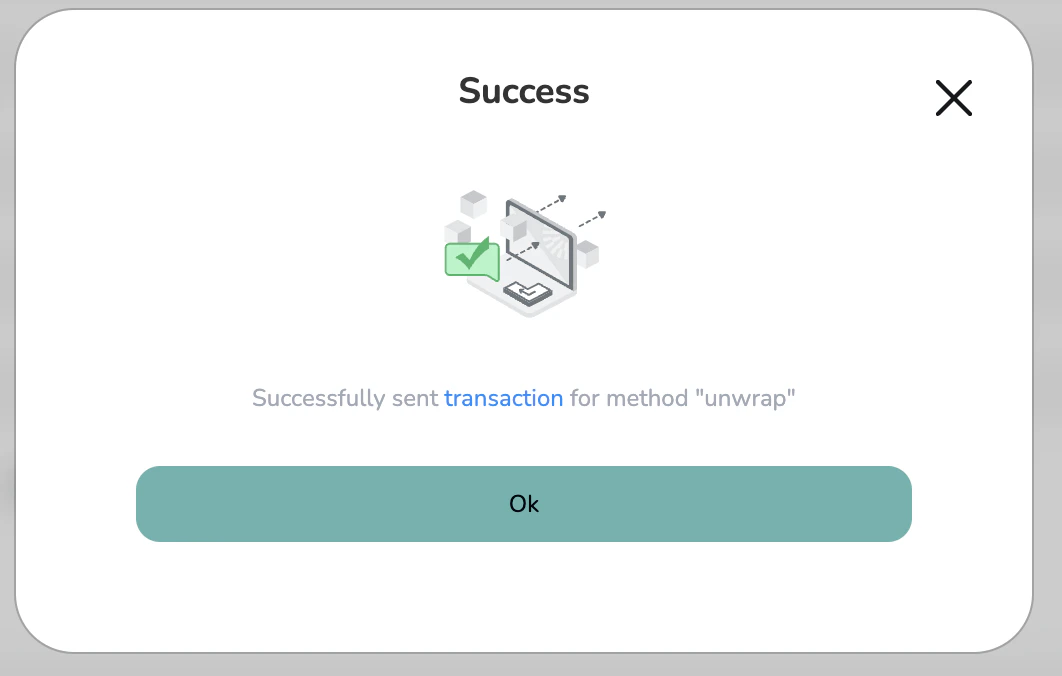
    <img src="https://mintcdn.com/ondofinance-8a00cd96/KRJ38X1ymyGq9hDd/images/docs/usdy-musd/img15.png?fit=max&auto=format&n=KRJ38X1ymyGq9hDd&q=85&s=4805a8c4798fd1c8c1b85c4ba44073bc" alt="Once the transaction is signed, you will see a Success message" width="300" data-path="images/docs/usdy-musd/img15.png" />

    <br />

    <figcaption>
      Once the transaction is signed, you will see a Success message
    </figcaption>
  </li>

  <li>
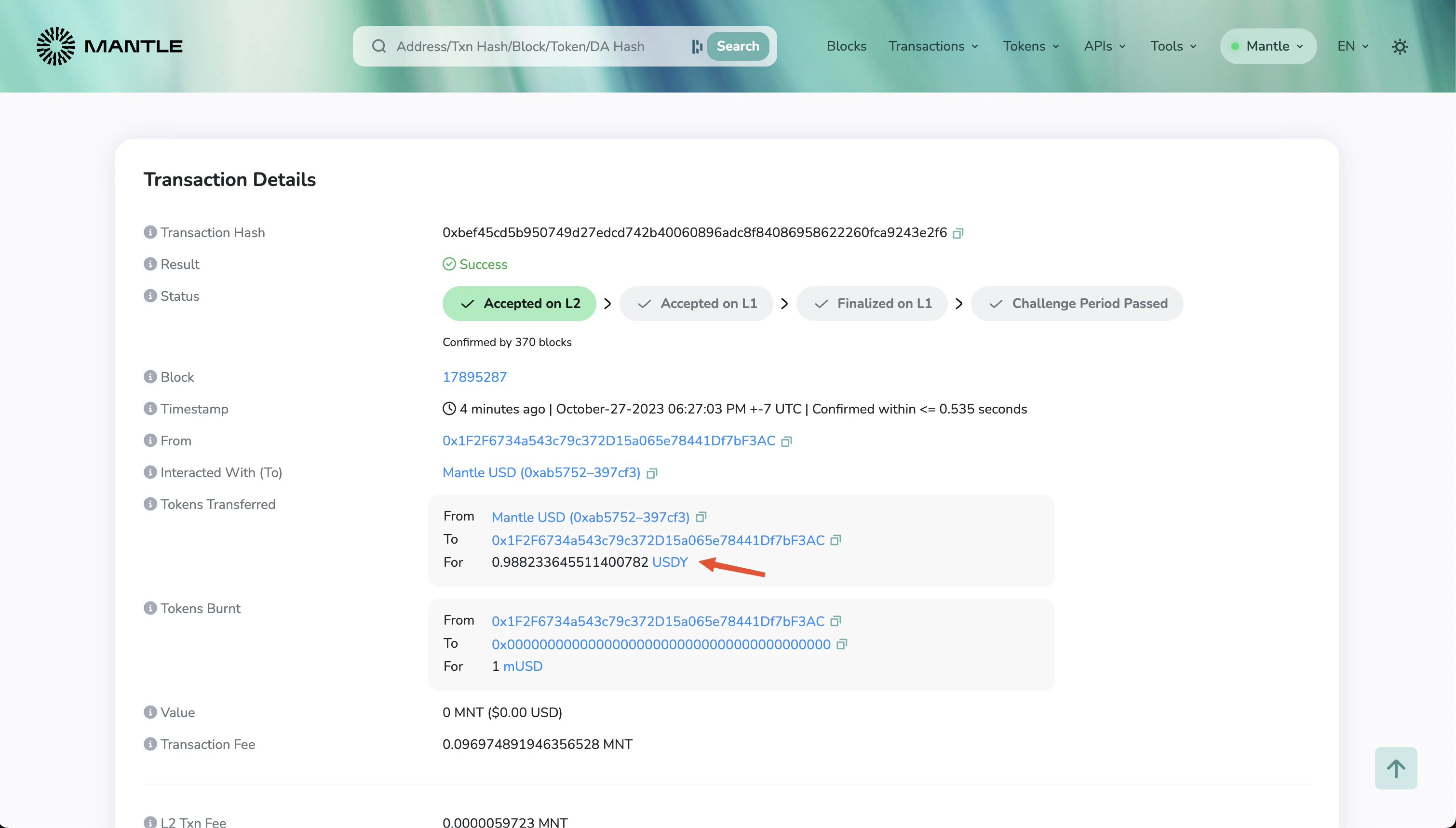
    <img src="https://mintcdn.com/ondofinance-8a00cd96/KRJ38X1ymyGq9hDd/images/docs/usdy-musd/img16.png?fit=max&auto=format&n=KRJ38X1ymyGq9hDd&q=85&s=9ed712994abba42fceac894c2665a395" alt="Clicking on the transaction link shows you the amount of USDY that you received in your wallet. In this example, 1 mUSD got converted to 0.9882 USDY" width="600" data-path="images/docs/usdy-musd/img16.png" />

    <br />

    <figcaption>
      Clicking on the transaction link shows you the amount of USDY that you
      received in your wallet. In this example, 1 mUSD got converted to 0.9882
      USDY
    </figcaption>
  </li>
</ul>